Proxies
Technical reference for the PDAccess proxy engine — protocol-aware brokering of SSH, RDP, VNC, and web sessions, with recording and control built into the data path.
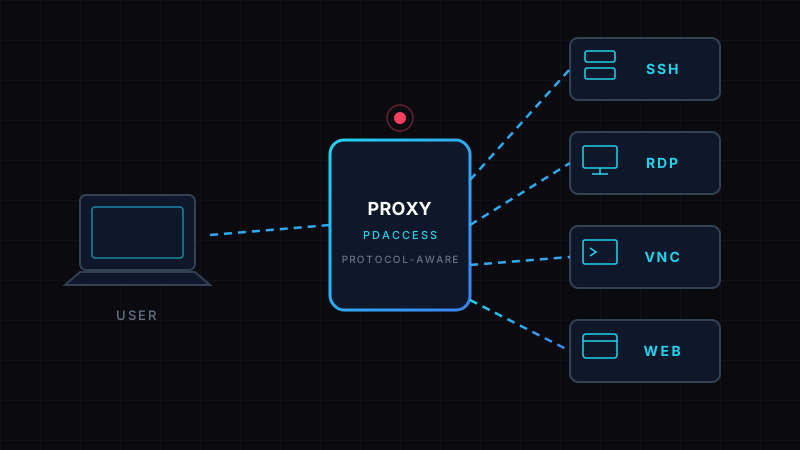
Overview
PDAccess does not forward traffic — it brokers sessions. Every privileged connection terminates at the PDAccess proxy engine, which authenticates the user, checks out the credential from the vault, authenticates to the target, and then carries the session as a protocol-aware broker. The client and the target never see each other's network endpoints, and the user never sees the credential.
Because the proxy speaks the protocol — it does not blind-tunnel it — recording, command authorization, and session control are built into the data path rather than layered on top.
Key properties:
- No direct client-to-target path — the client connects only to PDAccess; the proxy opens the connection to the target
- Zero-knowledge credentials — the vault secret is injected at target authentication and never reaches the client
- Protocol-aware — the proxy parses the session, not just the TCP stream
- Every session recorded — video and/or command log, depending on protocol
Connection Flow
- The client opens a TLS connection to the PDAccess proxy listener for the protocol (e.g.,
ssh user@pdaccess.example.com) - The proxy authenticates the user against the configured identity adapter (LDAP, RADIUS, TACACS+, or OAuth 2.0 / OIDC)
- The proxy evaluates access policies: role, time window, source IP, approval state
- On approval, the proxy checks out the target credential from the vault and opens a new connection to the target
- The proxy injects the credential at target authentication; both legs are live and the proxy carries the session
- On disconnect or kill, both legs close and the audit record is sealed
SSH Proxy
The SSH proxy accepts standard SSH clients on port 22 (or a dedicated listener port) and brokers the session to the target host.
- Protocol: SSH-2 (RFC 4253), port 22
- Target addressing:
user@pdaccess-hostresolves to a PDAccess target asset; the proxy maps the asset to its real endpoint - Credential injection: the vault's username/password or key is applied at target authentication — the client authenticates to PDAccess with its own identity (password, MFA, or certificate)
- Session channels: interactive shell, SFTP subsystem, and port-forward channels are all carried through the broker
- Command logging: every command line with timestamp and output is captured to the session log
- Command authorization: policies can allow, deny, or prompt-approve individual commands (e.g., block
rm -rf /, require approval foriptables) - Host key verification: the proxy maintains the target host key; the client sees the PDAccess host key, so no new
known_hostsentries are needed on client machines
The Linux Agent extends this to per-user attribution on multi-user hosts and enforces command authorization at the shell level.
RDP Proxy
The RDP proxy brokers Microsoft Remote Desktop (MS-RDP) sessions on port 3389.
- Protocol: MS-RDP over TCP 3389
- Screen recording: full-resolution video capture of the remote desktop for the entire session
- Clipboard control: clipboard redirection is policy-controlled — read-only, one-way, or disabled
- Drive redirection: disabled by default; file transfer only through the audited channel
- Live monitoring: an administrator can view any active RDP session in real time
- Session takeover: on policy violation, the proxy can transfer an active session to an administrator
VNC Proxy
The VNC proxy brokers VNC (RFB) sessions on port 5900 for devices that do not run RDP — network equipment consoles, embedded systems, legacy appliances.
- Protocol: RFB (VNC), port 5900
- Screen recording: framebuffer capture for the whole session
- Input logging: every keystroke and pointer event is logged with timestamps
- Same policy engine: time windows, approval, source IP, and kill behave identically to SSH and RDP
Web-Based Access
For web applications and hardware management interfaces (IPMI, iLO, iDRAC, web consoles), PDAccess provides a browser-based access path.
- The user's browser connects to PDAccess; the proxy authenticates the user and the target credential
- The user interacts with the target's web UI through the PDAccess front end — no direct network route to the target is opened
- Session recording: the web session is recorded as video of the rendered UI
- SSO pass-through: OAuth 2.0 / OIDC identity is used to authenticate the web target where the application supports it
- Copy-paste and file upload are policy-controlled and logged
Recording and Session Control
All protocols share the same control plane:
- Video recording for RDP, VNC, and web sessions
- Command log for SSH (text-level, searchable)
- Live view — monitor any active session
- Instant kill — terminate both legs of a session from the console
- Session replay — recordings and logs are replayable for incident investigation
- Search — sessions are searchable by user, target, date, tag, and command content
Network Topology
- Targets never need inbound exposure to client networks — only to PDAccess
- PDAccess can be deployed on-premises, in a VPC, or at the edge; the Linux Agent extends control to hosts behind the target
- All legs are encrypted: the client leg is TLS (mTLS where a client certificate is provisioned), and the target leg uses the protocol's native security (SSH, TLS-wrapped RDP/VNC)